
Best Business Laptops Under $900 (2026): 5 Picks by Specs
The top pick for business laptops in this guide's price window is the HP 17 inch touchscreen model, which states 32GB of RAM, the most of any laptop in this window, and a 17 inch touch screen. This guide compares five laptops on their stated specifications and live prices, using a shortlist rule that requires Windows 11 Pro, a weight at or below 2.2kg, at least 8GB of RAM, and a price within the guide's window. The ordering follows RAM, then storage, then weight, so the list is easy to read.
5 picks from 6 laptops that match this guide with a price we can quote today. Every price below is live and carries the moment it was read.
The picks at a glance
| # | Pick | Laptop | Price |
|---|---|---|---|
| 1 | Most RAM in this list | HP 17 Inch Touchscreen Laptop | $895.99 price as of 2026-10-10 08:21 UTC (Details) |
| 2 | 24GB of RAM and a touch screen | HP 15.6" FHD IPS Touchscreen Laptop | $899.99 price as of 2026-10-10 08:21 UTC (Details) |
| 3 | Lightest pick with 1TB of storage | Lenovo New Gen V-Series Business Laptop | $899.99 price as of 2026-10-10 08:22 UTC (Details) |
| 4 | 1TB of storage on a 15.6 inch screen | HP Latest 15.6" FHD Business Laptop | $849.99 price as of 2026-10-10 08:21 UTC (Details) |
| 5 | 16GB of RAM with a touch screen | Dell 15 Laptop DC15250 Touchscreen | $859.99 price as of 2026-10-10 08:21 UTC (Details) |
Which one should you buy?
- For an owner who sets up a small office: A single laptop that becomes the office's main workstation benefits from 32GB of RAM and a 17 inch touch screen, so many open documents and spreadsheets stay reachable. See pick 1
- For someone who works from a spare room: A 15.6 inch touch screen with 24GB of RAM leaves room for documents, browser tabs and a call on one screen, without taking up a large desk. See pick 2
- For a consultant who travels every week: The lightest pick at 1.37kg with a 14 inch screen fits a carry bag, while 1TB of storage holds project files between client visits. See pick 3
- For an accountant with wide spreadsheets: A 15.6 inch screen with 1TB of storage keeps large workbooks and archived files on one machine, with 16GB of RAM for several open sheets. See pick 4
The 5 picks
1 Most RAM in this list

HP 17 Inch Touchscreen Laptop
- CPU
- AMD Ryzen 5 7430U
- RAM
- 32 GB
- Storage
- 512 GB
- Screen
- 17 in
- Touchscreen
- Yes
- Weight
- 2.19 kg
- OS
- Windows 11 Pro
$895.99 price as of 2026-10-10 08:21 UTC (Details)
This pick leads because it states 32GB of RAM, the highest amount in the five-listing pool. The 17 inch touch screen is also the largest stated screen here, which gives the most room for spreadsheets and side-by-side windows. It ranks first on the guide's ordering rule of RAM, then storage, then weight.
Pros
- 32GB of RAM, the most of the five picks
- 17 inch touch screen, the largest screen stated here
- Stated weight of 2.19kg, within the guide's 2.2kg cap
- Windows 11 Pro stated
Cons
- 512GB of storage, less than the two 1TB picks
- Heaviest pick at 2.19kg
- 17 inch screen may be bulky for daily carrying
Good fit if
- Someone who wants the most RAM available in this guide
- A worker who prefers a large 17 inch touch screen
Skip if
- A traveler who wants a light laptop (the Lenovo is 1.37kg)
- Someone who needs 1TB of storage
Verdict: 32GB of RAM with a 17 inch touch screen put this HP at the top of this list.
2 24GB of RAM and a touch screen

HP 15.6" FHD IPS Touchscreen Laptop
- CPU
- Intel Core 7 150U
- RAM
- 24 GB
- Storage
- 512 GB
- Screen
- 15.6 in
- Touchscreen
- Yes
- Weight
- 1.7 kg
- OS
- Windows 11 Pro
$899.99 price as of 2026-10-10 08:21 UTC (Details)
With 24GB of RAM, this HP ranks second, just behind the 32GB model. Its 15.6 inch touch screen and 1.7kg weight place it above the 16GB picks that follow.
Pros
- 24GB of RAM, the second highest here
- 15.6 inch touch screen
- 1.7kg stated weight
- 512GB of storage
Cons
- 512GB storage, same as the Dell and the HP 17
- No 1TB option stated
- Heavier than the Lenovo and the HP Latest
Good fit if
- A worker who keeps many documents and browser tabs open with 24GB
- Someone who wants a 15.6 inch touch screen
Skip if
- Someone who needs 1TB of storage
- A traveler who wants a lighter machine than 1.7kg
Verdict: 24GB of RAM and a touch screen make this HP a strong middle pick for office work.
3 Lightest pick with 1TB of storage
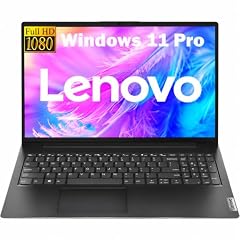
Lenovo New Gen V-Series Business Laptop
- CPU
- Intel Core 7 240H
- RAM
- 16 GB
- Storage
- 1000 GB
- Screen
- 14 in
- Weight
- 1.37 kg
- Battery
- 47 Wh
- OS
- Windows 11 Pro
$899.99 price as of 2026-10-10 08:22 UTC (Details)
This Lenovo states 16GB of RAM and 1TB of storage, the same headline figures as the HP Latest pick, but at 1.37kg it is lighter, so it ranks third on the tie-break by weight. The 14 inch screen makes it the smallest here, which suits a bag.
Pros
- 1TB of storage, tied for the most here
- 1.37kg, the lightest of the five picks
- 14 inch screen for easy carrying
- 16GB of RAM
Cons
- 14 inch screen is the smallest here
- Touch screen not stated
- 16GB of RAM, below the 24GB and 32GB models
Good fit if
- A consultant who carries a laptop between meetings
- Someone who wants 1TB of storage in a light chassis
Skip if
- Someone who wants a screen larger than 14 inches
- Someone who wants a touch screen
Verdict: The lightest pick here, this Lenovo trades a small screen for 1TB of storage in a 1.37kg frame.
4 1TB of storage on a 15.6 inch screen

HP Latest 15.6" FHD Business Laptop
- CPU
- Intel Core i7
- RAM
- 16 GB
- Storage
- 1000 GB
- Screen
- 15.6 in
- Weight
- 1.66 kg
- OS
- Windows 11 Pro
$849.99 price as of 2026-10-10 08:21 UTC (Details)
This HP also states 16GB of RAM and 1TB of storage, but at 1.66kg it is heavier than the Lenovo, so it ranks fourth. The 15.6 inch screen is larger than the Lenovo's 14 inch, which is the trade-off.
Pros
- 1TB of storage, tied for the most here
- 15.6 inch screen
- 1.66kg stated weight
- 16GB of RAM
Cons
- Touch screen not stated
- 16GB of RAM, below the 24GB and 32GB models
Good fit if
- Someone who wants 1TB of storage on a 15.6 inch screen
- A worker who does not need a touch screen
Skip if
- Someone who wants a touch screen
- Someone who wants more than 16GB of RAM
Verdict: A 15.6 inch screen with 1TB of storage makes this HP a practical choice at 16GB of RAM.
5 16GB of RAM with a touch screen
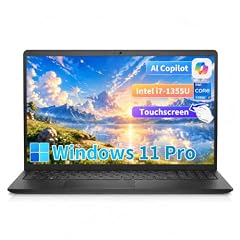
Dell 15 Laptop DC15250 Touchscreen
- CPU
- Intel Core i7-1355U
- RAM
- 16 GB
- Storage
- 512 GB
- Screen
- 15.6 in
- Touchscreen
- Yes
- Weight
- 1.94 kg
- OS
- Windows 11 Pro
$859.99 price as of 2026-10-10 08:21 UTC (Details)
This Dell completes the list with 16GB of RAM and 512GB of storage, the smallest storage amount in the pool. At 1.94kg it is heavier than the other 16GB picks, so it ranks last under the ordering rule.
Pros
- 16GB of RAM
- 15.6 inch touch screen
- 512GB of storage
- Windows 11 Pro stated
Cons
- 512GB of storage, the smallest amount in the pool
- 1.94kg, heavier than the Lenovo and the HP Latest
Good fit if
- Someone who wants a 15.6 inch touch screen at 16GB
- An office worker with modest storage needs
Skip if
- Someone who needs 1TB of storage
- Someone who wants a lighter laptop than 1.94kg
Verdict: A dependable 15.6 inch touch screen with 16GB of RAM, this Dell rounds out this list.
Side by side
| # | Laptop | CPU | GPU | GPU memory | Rentable GPU model | RAM | Storage |
|---|---|---|---|---|---|---|---|
| 1 | HP 17 Inch Touchscreen Laptop | AMD Ryzen 5 7430U | not stated | not stated | not stated | 32 GB | 512 GB |
| 2 | HP 15.6" FHD IPS Touchscreen Laptop | Intel Core 7 150U | not stated | not stated | not stated | 24 GB | 512 GB |
| 3 | Lenovo New Gen V-Series Business Laptop | Intel Core 7 240H | not stated | not stated | not stated | 16 GB | 1000 GB |
| 4 | HP Latest 15.6" FHD Business Laptop | Intel Core i7 | not stated | not stated | not stated | 16 GB | 1000 GB |
| 5 | Dell 15 Laptop DC15250 Touchscreen | Intel Core i7-1355U | not stated | not stated | not stated | 16 GB | 512 GB |
How we picked
This guide covers five business laptops drawn from a pool of listings that match one rule: a stated Windows 11 Pro operating system, a stated weight of 2.2kg or less, at least 8GB of stated RAM, and a listed price within the guide's price window. Every pick in the pool is included. The laptops are compared on the specifications stated in each listing and on live prices; the catalogue does not record battery life, security features, warranty terms or other unlisted data, so the guide does not guess at them. The picks are ordered by stated RAM (most first), then by stated storage, then by lower weight, with ties broken by the order in the pool file. This ordering rule keeps the comparison transparent and repeatable.
How to choose
What the price window means
This guide covers laptops whose listings state a price within the guide's price window. All five picks sit inside that window, so the comparison shows what this budget buys. The guide does not include cheaper or more expensive laptops; the list is a picture of one price range.
RAM when documents, tabs and a call stay open
Three of the five picks state 16GB of RAM, one states 24GB, and one states 32GB. For a worker who keeps many documents, spreadsheets and browser tabs open, a higher figure gives more headroom. The 32GB HP leads the list, while the 16GB models still provide room for typical office tasks.
Storage for files and archives
Three picks state 512GB of storage and two state 1TB. A 512GB drive holds local files, mail archives and project folders; the 1TB models offer twice the space. Buyers who archive many large files can look at the Lenovo or the HP Latest, the two 1TB picks.
Screen size, weight and the bag
Screens run from 14 inches on the Lenovo to 17 inches on the HP 17. A 14 inch screen is easier to carry, while a 15.6 or 17 inch screen shows more of a spreadsheet or two windows side by side. Weight runs from 1.37kg to 2.19kg, all within the guide's 2.2kg cap. Three picks state a touch screen; the Lenovo and the HP Latest do not.
Reading the operating system line
Every listing states Windows 11 Pro. The Windows 11 specs page lists the operating system's minimum system requirements. The Pro edition is the line named in each listing, and the page explains what the OS requires generally.
What this guide leaves out (and why)
The catalogue does not state battery life in hours, charging speed, keyboard feel, security features, warranty terms, or dedicated graphics for these picks. This guide compares only the specifications stated in the listings and the live prices, and does not guess at unlisted data. A buyer who needs those details should read the individual listing and the maker's page.
Questions
Does this guide cover battery life, security features or warranty terms?
No. The catalogue lists RAM, storage, screen size, weight, operating system and price, but it does not record battery life in hours, charging speed, security features, warranty terms, or build quality. This guide compares only the stated specifications and live prices, and does not guess at unlisted data. A buyer who needs those details should read the listing.
Why is the HP 17 inch the top pick?
The HP 17 inch states 32GB of RAM, the most of any laptop in this guide's pool. The guide orders picks by RAM first, then storage, then weight, so this HP leads. Its 17 inch touch screen is also the largest screen stated in the pool.
Are all five picks Windows 11 Pro?
Yes. The shortlist rule requires a listing that states Windows 11 Pro, a weight at or below 2.2kg, at least 8GB of RAM, and a price within the guide's price window. Every laptop in the pool meets that rule, so all five picks carry the Pro line.
What if a listing does not state a touch screen?
The Lenovo and the HP Latest do not state a touch screen, while the other three picks do. This guide reports what each listing states and does not assume a touch screen is present when the listing is silent. Buyers who need a touch screen can choose from the three that state one.
How is the list ordered?
Picks are ordered by stated RAM (most first), then by stated storage, then by lower weight. Ties are broken by the order in the pool file. Price is not part of the ordering, because every pick sits in the same price window.
Where do the specifications come from?
The specifications come from the seller listings in the pool. The guide compares the laptops on those stated specifications and on live prices. The catalogue does not provide data for battery life, security features, or warranty terms, and this guide does not guess at them.
Recent updates
- : First published.