
Best Business Laptops Under 1100 in 2026: 4 Picks by Specs
The top pick in this guide for business laptops under $1,100 is the HP OmniBook 17.3 with an Intel Core Ultra 7 255U, 16GB of RAM and 2TB of stated storage, the largest storage and the largest screen in this price window. The shortlist holds four listings that state Windows 11 Pro, 16GB of RAM and a weight of 2.2kg or less, compared on stated specifications and live prices.
4 picks from 5 laptops that match this guide with a price we can quote today. Every price below is live and carries the moment it was read.
The picks at a glance
| # | Pick | Laptop | Price |
|---|---|---|---|
| 1 | 2TB of stated storage and a 17.3 inch screen | HP OmniBook 17.3" FHD AI PC | $1,099.00 price as of 2026-10-10 08:22 UTC (Details) |
| 2 | The pick with a stated touch screen | Lenovo Yoga 7i 16" 2-in-1 Touchscreen Laptop Intel Ultra 7 256V | $1,059.99 price as of 2026-10-10 08:23 UTC (Details) |
| 3 | Lightest pick in this list | HP EliteBook 6 G1a 16 Laptop | $1,099.99 price as of 2026-10-10 08:21 UTC (Details) |
| 4 | Only pick that states a graphics card | Lenovo ThinkPad E16 16 Ryzen 7 7735HS 16GB DDR5 512GB SSD Type-C Hub | $1,093.99 price as of 2026-10-10 08:22 UTC (Details) |
Which one should you buy?
- For an accountant with wide spreadsheets: A 16 or 17.3 inch screen shows more columns of a spreadsheet at once, and all four picks state 16GB of RAM for many open documents. See pick 1
- For someone who keeps years of project files: The picks state between 512GB and 2TB of storage; the Yoga 7i states 1TB for a large archive without moving to the 2TB pick. See pick 2
- For a consultant who travels every week: At 1.75kg, the EliteBook is the lightest pick here, a point for a bag carried between meetings and trips. See pick 3
- For an owner who runs a one-person office: All four state 16GB of RAM and Windows 11 Pro; the ThinkPad E16 is the only one here whose listing also states a Radeon 680M. See pick 4
The 4 picks
1 2TB of stated storage and a 17.3 inch screen

HP OmniBook 17.3" FHD AI PC
- CPU
- Intel Core Ultra 7 255U
- RAM
- 16 GB
- Storage
- 2000 GB
- Screen
- 17.3 in
- Weight
- 2.01 kg
- OS
- Windows 11 Pro
$1,099.00 price as of 2026-10-10 08:22 UTC (Details)
Ranks first because it states the most storage in the pool, 2TB, and the largest screen at 17.3 inches. On the ordering rule, storage comes before weight, so it leads despite being the heaviest pick at 2.01kg.
Pros
- 2TB of stated storage, the most in this list
- 17.3 inch screen, the largest here
- 16GB of RAM as stated
- Windows 11 Pro stated
Cons
- 2.01kg, the heaviest pick here
- Does not state a touch screen
- Storage is listed as 1TB SSD plus a 1TB docking station
Good fit if
- An accountant or analyst who wants a large screen
- A worker who keeps large project archives on the machine
Skip if
- Someone who carries the laptop daily and wants a lighter bag
- A buyer who needs a stated touch screen
Verdict: The OmniBook leads this list on stated storage and screen size.
2 The pick with a stated touch screen
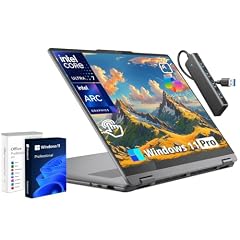
Lenovo Yoga 7i 16" 2-in-1 Touchscreen Laptop Intel Ultra 7 256V
- CPU
- Intel Core Ultra 7 256V
- RAM
- 16 GB
- Storage
- 1000 GB
- Screen
- 16 in
- Touchscreen
- Yes
- Weight
- 1.91 kg
- OS
- Windows 11 Pro
$1,059.99 price as of 2026-10-10 08:23 UTC (Details)
Ranks second with 1TB of stated storage, ahead of the two 512GB machines. Its touch screen statement is unique in this pool, and its 1.91kg weight sits between the OmniBook and the lighter pair.
Pros
- 1TB of stated storage
- Touch screen stated, the only pick here with one
- 16GB of RAM stated
- Intel Core Ultra 7 256V stated
Cons
- 1.91kg, heavier than two of the picks
- No dedicated graphics stated in the listing
Good fit if
- Someone who wants a 2-in-1 and a stated touch screen
- A worker who needs 1TB of storage without moving up to the 2TB pick
Skip if
- A buyer who wants the lightest machine in this window
- Someone who does not need a touch screen
Verdict: The Yoga 7i is the touch-screen 2-in-1 of this list, with 1TB of stated storage.
3 Lightest pick in this list
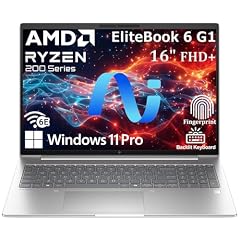
HP EliteBook 6 G1a 16 Laptop
- CPU
- AMD Ryzen 5 220
- RAM
- 16 GB
- Storage
- 512 GB
- Screen
- 16 in
- Weight
- 1.75 kg
- OS
- Windows 11 Pro
$1,099.99 price as of 2026-10-10 08:21 UTC (Details)
Ranks third: it ties the ThinkPad on 16GB of RAM and 512GB of storage, and wins on lighter weight at 1.75kg. Both 512GB machines sit below the 1TB and 2TB picks on the ordering rule.
Pros
- 1.75kg, the lightest here
- 16GB of RAM stated
- 512GB of storage stated
- Windows 11 Pro stated
Cons
- 512GB of storage, the smallest tied in this list
- No touch screen stated
Good fit if
- A consultant who carries the laptop between meetings
- A worker who is fine with 512GB and keeps archives elsewhere
Skip if
- Someone who needs 1TB or more of local storage
- A buyer who wants a stated touch screen
Verdict: The EliteBook is the lightest pick here, a point for frequent carrying.
4 Only pick that states a graphics card

Lenovo ThinkPad E16 16 Ryzen 7 7735HS 16GB DDR5 512GB SSD Type-C Hub
- CPU
- AMD Ryzen 7 7735HS
- GPU
- Radeon 680M
- RAM
- 16 GB
- Storage
- 512 GB
- Screen
- 16 in
- Touchscreen
- No
- Weight
- 1.77 kg
- OS
- Windows 11 Pro
$1,093.99 price as of 2026-10-10 08:22 UTC (Details)
Ranks last on the ordering rule: it ties the EliteBook on RAM and storage, then loses on weight at 1.77kg against 1.75kg. Its listing is the only one here to state a Radeon 680M.
Pros
- States a Radeon 680M, unique in this pool
- 16GB of RAM stated
- 512GB of storage stated
- 16 inch screen stated
Cons
- 512GB of storage, the smallest tied in this list
- 1.77kg, slightly heavier than the EliteBook
Good fit if
- A buyer who wants a stated graphics card in the listing
- An owner who prefers the ThinkPad line's 16 inch screen
Skip if
- Someone who wants the lightest pick in this window
- A buyer who needs more than 512GB of stated storage
Verdict: The ThinkPad E16 closes the list at 1.77kg with a stated Radeon 680M.
Side by side
| # | Laptop | CPU | GPU | GPU memory | Rentable GPU model | RAM | Storage |
|---|---|---|---|---|---|---|---|
| 1 | HP OmniBook 17.3" FHD AI PC | Intel Core Ultra 7 255U | not stated | not stated | not stated | 16 GB | 2000 GB |
| 2 | Lenovo Yoga 7i 16" 2-in-1 Touchscreen Laptop Intel Ultra 7 256V | Intel Core Ultra 7 256V | not stated | not stated | not stated | 16 GB | 1000 GB |
| 3 | HP EliteBook 6 G1a 16 Laptop | AMD Ryzen 5 220 | not stated | not stated | not stated | 16 GB | 512 GB |
| 4 | Lenovo ThinkPad E16 16 Ryzen 7 7735HS 16GB DDR5 512GB SSD Type-C Hub | AMD Ryzen 7 7735HS | Radeon 680M | not stated | not stated | 16 GB | 512 GB |
How we picked
The shortlist holds four listings that all state Windows 11 Pro, weigh 2.2kg or less, have 8GB or more RAM, and sit within the price window defined by the keyword. All four state 16GB of RAM and qualify. The laptops are compared on the specifications stated in each listing and on live prices. The catalogue does not state battery life, security features or warranty terms, so those are not covered here. Picks are ranked by stated RAM, then stated storage, then lower weight, with ties broken by the order in the pool file.
How to choose
What the price window holds
In this price window, the catalogue shows four listings that all state Windows 11 Pro, 16GB of RAM and a weight of 2.2kg or less. Buyers who want these specifications at this price level can compare the four on the remaining stated specs: screen size, storage, weight and a touch screen. None of the listings is a compact model; all four are 16 inch or 17.3 inch machines.
RAM when documents, tabs and a call stay open
All four listings state 16GB of RAM. The operating system vendor lists 4GB as the minimum requirement for Windows 11, so 16GB leaves room for many documents, spreadsheets and browser tabs open at the same time. For business work that keeps several applications on screen, 16GB is the common figure across this pool, and no pick here states less.
Screen size, weight and the bag
The screens here range from 16 inches to 17.3 inches. A larger screen shows more of a spreadsheet or two windows side by side; a smaller one fits more easily into a bag. The stated weights run from 1.75kg to 2.01kg. A consultant who carries the laptop between meetings may prefer the lighter end, while a desk worker can accept the heaviest pick for its screen size.
Storage for files and archives
Stated storage runs from 512GB to 2TB across the four picks. The OmniBook lists 2TB as 1TB SSD plus a 1TB docking station, the Yoga 7i states 1TB, and the EliteBook and ThinkPad state 512GB. Workers who keep project folders, mail archives and large files on the machine will want the higher figures; those who store archives elsewhere can manage with 512GB.
What this guide leaves out (and why)
The catalogue holds no data on battery life in hours, keyboard feel, display color or brightness, build quality, security features, warranty terms or support promises. This guide compares only what the listings state: RAM, storage, screen size, weight, operating system and, for one pick, a graphics card. Buyers who need those other details should read the listings themselves.
Questions
Does this guide cover battery life, security features or warranty terms?
No. The catalogue entries state the operating system, RAM, storage, screen size and weight, but they hold no data on battery life in hours, charging speed, security features such as fingerprint readers or encryption, and warranty or support terms. This guide does not guess at those details; a buyer who needs them should look at the listing or ask the seller.
Why does the OmniBook rank first when it is the heaviest pick?
The ordering rule for this guide is stated RAM first, then stated storage, then lower weight. All four picks state 16GB of RAM, so the ranking moves to storage. The OmniBook states 2TB, more than the 1TB Yoga and the 512GB pair, so it ranks first even though its 2.01kg weight is the highest in the list.
What does the Windows 11 Pro line on a listing tell me?
Each listing in this pool states Windows 11 Pro as the operating system, and that is part of the shortlist rule. The operating system vendor describes Windows 11 Pro as an edition aimed at business use, distinct from the home edition. Buyers who need the Pro edition line on the listing will find it on all four picks here.
How many of these picks state a touch screen?
One. The Lenovo Yoga 7i 16 states a touch screen and is described as a 2-in-1 in its listing name. The OmniBook, EliteBook and ThinkPad listings do not state a touch screen. A buyer who needs a stated touch screen should start with the Yoga, and one who does not can compare the other three on storage and weight.
Are all four picks really priced under the keyword's ceiling?
Yes, all four picks fall within the price ceiling set by this guide's keyword, so none of them exceeds the stated limit. The page beside each pick shows its live price and the time that price was read.
Recent updates
- : First published.